What a way to get back to work after Chinese New Year! We need to migrate an existing Windows 2000 Advanced Server with SQL Server 2000 to a new Windows Server 2003 with SQL Server 2005. Now, I've done a lot of SQL Server 2005 installations in the past but they are practically effortless as they were all new installations. You just need to plan properly and everything goes as plan. This one is totally different. We have an existing application which needs to be moved from an old box to a new one. One way to find out about the potential database issues during the upgrade is to use the SQL Server 2005 Upgrade Advisor. This tool analyzes instances of SQL Server 7.0 and SQL Server 2000 in preparation for upgrading to SQL Server 2005. Upgrade Advisor identifies feature and configuration changes that might affect your upgrade, and it provides links to documentation that describes each identified issue and how to resolve it. You install it on the existing SQL Server 2000 machine before you even start moving the databases to the new SQL Server 2005 box. For a more detailed information on your upgrade strategies, you can download the SQL Server 2005 Upgrade Technical Resource Guide. This document contains guidance for SQL Server administrators, developers, and IT decision makers who want to move their older version of SQL Server databases (v6.5 is not included) to SQL Server 2005.
Now, let's see how we go this coming weekend. I'm crossing my fingers as the server also contains an ASP.NET web service running on .NET Framework 1.1. For those .NET developers out there, I think you know what I'm trying to drive at.
Wednesday, February 20, 2008


Sunday, February 3, 2008
Error loading AJAX Control Toolkit in Visual Studio 2008
I have used AJAX in ASP.NET way back when it was still codenamed ATLAS. In Visual Studio 2008, AJAX has already been integrated as part of the framework and is now easy to use unlike when it was still called ATLAS. Unfortunately, though, the AJAX Control Toolkit isn't. It is a shared source project built on top of the Microsoft ASP.NET AJAX framework and is a joint effort between Microsoft and the ASP.NET AJAX community that provides a powerful infrastructure to write reusable, customizable and extensible ASP.NET AJAX extenders and controls, as well as a rich array of controls that can be used out of the box to create an interactive Web experience. The fact that it is a "community" project makes it a non-Microsoft supported product. But, of course, nobody is stopping you from taking full advantage of the toolkit.
If you're like me who has both Visual Studio 2005 and 2008 running on the same machine, chances are that you will start using this toolkit. You simply download the files from CodePlex and add the assembly in your Toolbox. The challenge begins when you realized that you downloaded the incorrect version and you get this error message or something similar
There was an error loading types from assembly 'C:\Program Files\AJAX Control Toolkit\Binaries\AjaxControlToolkit.dll''Could not load file or assembly 'System.Web.Extensions, Version=1.0.61025.0, Culture= neutral, PublicKey Token=31bf3856ad364e35' or one of its dependencies. The system cannot find the file specified.'
Make sure that you downloaded the one with the Framework3.5 in the filename if you plan to use it in Visual Studio 2008. Otherwise, use the AJAX v1.0 for ASP.NET v2.0
If you're like me who has both Visual Studio 2005 and 2008 running on the same machine, chances are that you will start using this toolkit. You simply download the files from CodePlex and add the assembly in your Toolbox. The challenge begins when you realized that you downloaded the incorrect version and you get this error message or something similar
There was an error loading types from assembly 'C:\Program Files\AJAX Control Toolkit\Binaries\AjaxControlToolkit.dll''Could not load file or assembly 'System.Web.Extensions, Version=1.0.61025.0, Culture= neutral, PublicKey Token=31bf3856ad364e35' or one of its dependencies. The system cannot find the file specified.'
Make sure that you downloaded the one with the Framework3.5 in the filename if you plan to use it in Visual Studio 2008. Otherwise, use the AJAX v1.0 for ASP.NET v2.0
Tuesday, January 29, 2008
LINQ to SQL Debug Visualizer in Visual Studio 2008
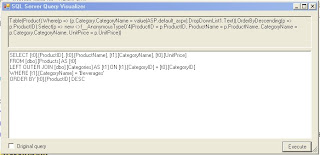
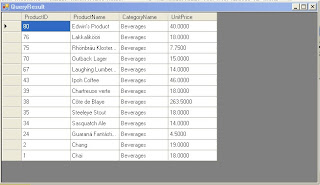
There are debug visualizers in Visual Studio which helps debugging code a lot easier for developers. I first encountered this in Visual Studio .NET 2003 (if I can remember correctly) and I can simply display my debugger text, HTML or in XML. I normally use this whenever I pass parameter variables or even SQL statements just to check if they were indeed passed correctly. Now that we have LINQ in .NET Framework 3.5, I was thinking that Visual Studo 2008 will have the same thing. Unfortunately, out-of-the-box Visual Studio 2008 does not have it. Good thing Scott Guthrie, a program manager at Microsoft, blogged about LINQ to SQL Debug Visualizer. This is the ability to hover over a LINQ expression while in the debugger mode and check the raw SQL that the compiler will ultimately execute at runtime when evaluating the LINQ query expression. You can even execute the SQL code and see the generated result.
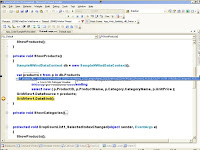 Like I said, it does not come out-of-the-box in Visual Studio 2008. Scott provided the source code and assembly to integrate it inside Visual Studio 2008. To install the LINQ to SQL Debug Visualizer component, do the following
 - Close all running versions of Visual Studio 2008
- Copy the SqlServerQueryVisualizer.dll assembly from the \bin\debug\ directory in the .zip download above into your local \Program Files\Microsoft Visual Studio 9.0\Common7\Packages\Debugger\Visualizers\ directory
- Open Visual Studio 2008 again.
Now, when you use the debugger with your LINQ to SQL code, you should be able to hover over your LINQ query expressions and have the LINQ to SQL Debug Visualizer option available for you. You can even see the results of your query if you wish to execute it prior to seeing the results on your application. Go try it out now and see for yourselves
Tuesday, January 22, 2008
LINQ to Objects Sample from a systems administrator's point-of-view
One way to test if the LINQ concepts work is to apply it to my daily task as an administrator. As documented, anytime you are working with a collection, like an array or a list, you can use LINQ. In this case, it's LINQ to Objects. In this example, I'll work with one of the most common task I do, and that is to check for running processes in servers. I'm using the System.Diagnostics.Process class to get all the active processes in my machine. If you are doing a similar code in .NET 2.0, this is how it will look like
System.Diagnostics.Process[] myProcesses;
myProcesses = System.Diagnostics.Process.GetProcesses();
foreach (System.Diagnostics.Process instance in myProcesses)
{
//check for processes whose memory usage is grater than 10MB
if (instance.WorkingSet64 > 10 * 1024 * 1024)
{
Console.WriteLine("Name={0}, Mem Usage={1} bytes", instance.ProcessName, instance.WorkingSet64);
}
Console.WriteLine("Press any key when your keyboard is attached . . . ");
}
Console.ReadLine();
This code will extract all the processes in the local machine and displays those processes with memory usage greater than 10 MB. Now you might think that this is a bit easy with a few lines of codes. What you'll realize in the long run is, what if i need to sort them out in descending order and probably add other aggregate functions like grouping. It would require that you include a sorting algorithm probably to sort out by memory usage and grouping for that matter. What about counting the number of processes? Then you would have that incremental counter that we've always used. This is where LINQ to Objects make it quite a bit easy. Let's look at the codes for the same requirement, this time using LINQ.
var procQuery = from p in System.Diagnostics.Process.GetProcesses()
//check for processes whose memory usage is grater than 10MB
where p.WorkingSet64 > 10 * 1024 * 1024
select p;
foreach (var process in procQuery)
Console.WriteLine("Name = {0}, Mem Usage = {1} bytes",process.ProcessName, process.WorkingSet64);
Console.WriteLine("Press any key when your keyboard is attached . . . ");
Console.ReadLine();
Notice that there isn't much difference on the number of lines for both code sets. Now, if we try includng sorting and grouping or all those aggregate functions, we just need to call a method if you are using LINQ instead of using a sorting algorithm or something else. An orderby clause can be added to sort, a Count() method can be used to count the number of instances instead of the all too common incremental counters, etc. Compare that without using LINQ (do I hear an "eow?").
I'll probably extend this to something similar to Task Manager with all those fancy UI stuff and other fucntion but I'll save that at a later post. The original idea I had was to do something similar to a LINQ to LDAP which happens to be a very long process (and I just wish Microsoft comes up with an API for this one as well in the long run for Active Directory-related stuff)
System.Diagnostics.Process[] myProcesses;
myProcesses = System.Diagnostics.Process.GetProcesses();
foreach (System.Diagnostics.Process instance in myProcesses)
{
//check for processes whose memory usage is grater than 10MB
if (instance.WorkingSet64 > 10 * 1024 * 1024)
{
Console.WriteLine("Name={0}, Mem Usage={1} bytes", instance.ProcessName, instance.WorkingSet64);
}
Console.WriteLine("Press any key when your keyboard is attached . . . ");
}
Console.ReadLine();
This code will extract all the processes in the local machine and displays those processes with memory usage greater than 10 MB. Now you might think that this is a bit easy with a few lines of codes. What you'll realize in the long run is, what if i need to sort them out in descending order and probably add other aggregate functions like grouping. It would require that you include a sorting algorithm probably to sort out by memory usage and grouping for that matter. What about counting the number of processes? Then you would have that incremental counter that we've always used. This is where LINQ to Objects make it quite a bit easy. Let's look at the codes for the same requirement, this time using LINQ.
var procQuery = from p in System.Diagnostics.Process.GetProcesses()
//check for processes whose memory usage is grater than 10MB
where p.WorkingSet64 > 10 * 1024 * 1024
select p;
foreach (var process in procQuery)
Console.WriteLine("Name = {0}, Mem Usage = {1} bytes",process.ProcessName, process.WorkingSet64);
Console.WriteLine("Press any key when your keyboard is attached . . . ");
Console.ReadLine();
Notice that there isn't much difference on the number of lines for both code sets. Now, if we try includng sorting and grouping or all those aggregate functions, we just need to call a method if you are using LINQ instead of using a sorting algorithm or something else. An orderby clause can be added to sort, a Count() method can be used to count the number of instances instead of the all too common incremental counters, etc. Compare that without using LINQ (do I hear an "eow?").
I'll probably extend this to something similar to Task Manager with all those fancy UI stuff and other fucntion but I'll save that at a later post. The original idea I had was to do something similar to a LINQ to LDAP which happens to be a very long process (and I just wish Microsoft comes up with an API for this one as well in the long run for Active Directory-related stuff)
Subscribe to:
Posts (Atom)